오늘은 Windows에서 내 PC에 설정된 공유폴더 리스트 확인
그리고 삭제하는 법등에 대해서 알아봅니다
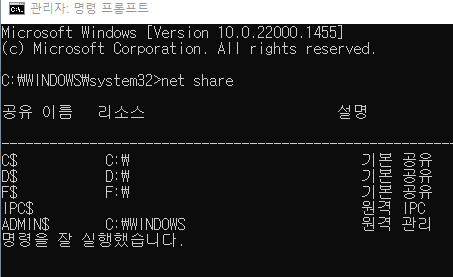
1. 공유폴더 확인
CMD창 불러옵니다.
윈도우+R 눌러서 명령창에 CMD 입력 엔더 합니다.
CMD를 관리자 권한으로 불러옵니다. 꼭 관리자 권한입니다.
net share
라고 입력합니다
그럼 현재 나에게 설정 되어 있는 공유폴더 리스트가 나옵니다.
IPC$는 특히 보안에 취약한대, 원격 컨트롤 시 사용하게 되는 폴더로 공유기능
사용시 중개 역활을 하는 폴더라고 생각하면 됩니다.
본인의 컴퓨터가 원격 데스크탑 서비스를 해야한다면 삭제하지 말아야 합니다.
2.폴더 삭제하기
netshare c$ /delete 이렇게 차례대로 타이핑 합니다. 지우고자 하는 폴더를
netshare "공유이름" /delete
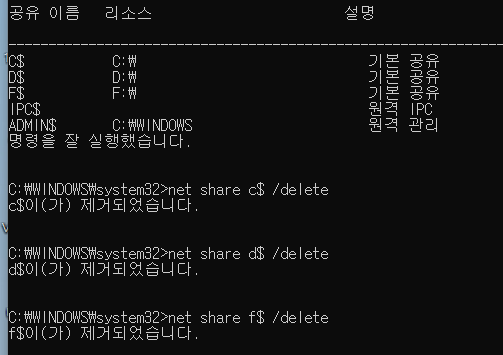
차례대로 지워주면 됩니다.
cmd 불러올때 꼭 관리자모드로 불러와야 에러가 안나니
주의하시기 바랍니다.


.jpeg)


 Posts
Posts


.jpg)
.jpg)

.png)


